


If you are having trouble converting files from PDF to JPG format, this article will help you succeed in this file conversion process. Here, we will show you how you can successfully transform the documents and preserve their quality. PDF files are a must use in the current technology. People meet the need to use PDF files at some point. This file type is required mostly for data, assignments, scanned documents, etc.
In some situations, the JPG copy of the PDF file needs to be used. Some websites may not accept the PDF format and would require a JPG copy of that document. You might meet the need to use JPG format while uploading your documents to an online classroom platform. In short, it might be convenient to convert PDF to JPG sometimes. What is the best way to perform such a file conversion? Don’t worry; we have the best solution for you.
Table of Contents
PDF WIZ
PDF WIZ is an all-purpose, compact PDF toolkit. PDF WIZ deals in customizing and converting PDF files. It is all-in-one software by StarzSoft. PDF WIZ helps make the PDF files able to be edited and increases their productivity. Hence, PDF WIZ is a fantastic choice for anyone dealing with PDF files or other different file formats.
PDF WIZ – Features
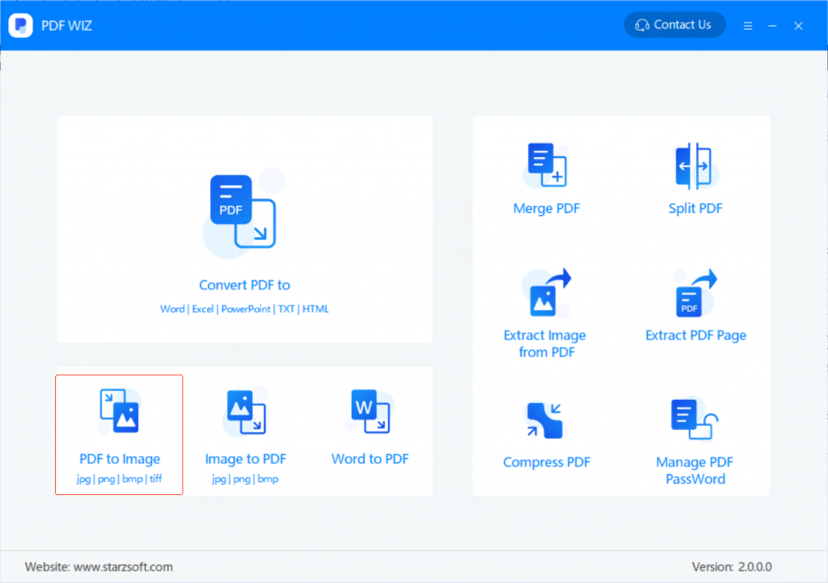
You can use PDF WIZ software to convert PDF files to word documents, JPG files, PPTX., HTML, TXT, etc. You can also use it to convert JPG files, MS Word documents, XPS files, etc. to PDF files. Furthermore, it also splits, compresses, and merges PDFs. Another great feature of PDF WIZ is that it can also extract a page or an image from a PDF file. You can add or delete a password from a PDF file using PDF WIZ.
Benefits of using PDF WIZ
The advantage of using PDF WIZ is that you can utilize it offline, so it is not affected by internet connectivity. The offline usage feature makes it more secure, reliable, and trustworthy. PDF WIZ has no limit, and you can upload files of any size. It is secure, fast, and reliable. Its software is easy to use and is user friendly.
You can perform almost any task in merely a few seconds. It keeps your private data secure. Therefore, you can convert many files at the same time by using PDF WIZ. Along with that, it is cheap and affordable. People from each course of life use it to get an advantage.
PDF to JPG and JPG to PDF Conversion
The PDF WIZ is a powerful kit by StarzSoft. One can use it to convert JPG images to PDF documents. It also allows you to do any JPG to PDF file conversion for free. It does so without affecting the quality of the original file. PDF files are used everywhere in today’s IT-based working environments. That is why converting from JPG to PDF or PDF to JPG is an essential activity for all technical or IT personnel.
Converting PDF to JPG with PDF WIZ
You can use PDF WIZ to convert a PDF file to high-quality JPG images using the following steps:
Step 1
Download PDF WIZ software from StarzSoft official website. After that, launch the software. Then select “PDF to Image” on the first screen to continue converting.

Step 2
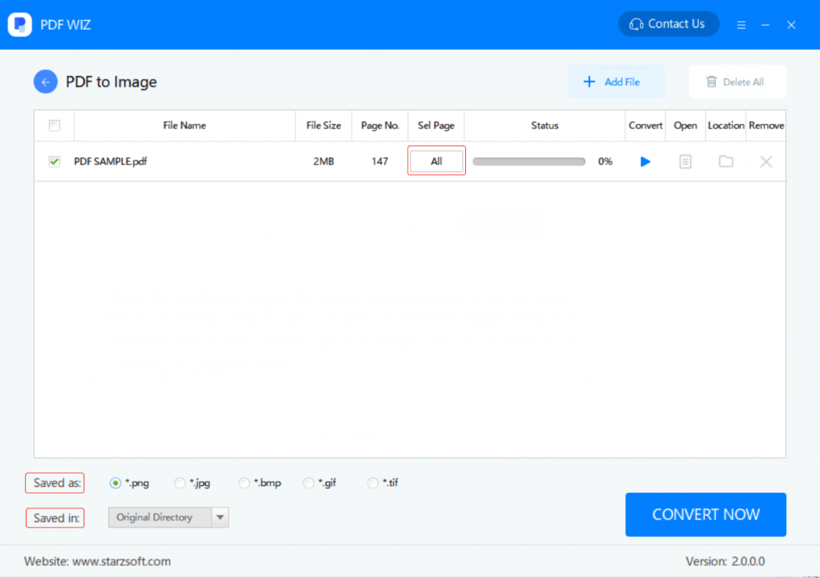
On the next screen, select the box field to pick a PDF file from your computer. You can also directly drag the PDF files to the converting box and drop it. You can perform multiple operations on multiple PDF files at the same time.

Step 3
From the dialog box given below, choose the image format you wish to convert your PDF file into. You can also decide how you want to save the newly transformed images. Select “CONVERT NOW” to start converting PDF to JPG format. The “ALL” option allows you to select all the pages in the PDF file for conversion.

Step 4
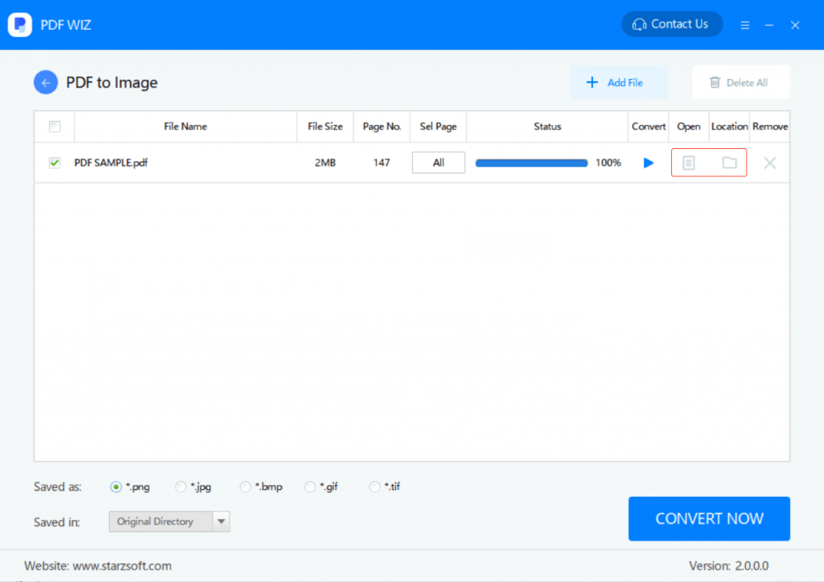
After the successful completion of the process, you can open the obtained JPG images. You can either directly open the file or open the folder by selecting their respective icons.

Conclusion
Converting files from one format to another is not a problem now. However, not every software or service provider offers reliable and high-quality services such as PDF WIZ. The PDF WIZ is an all in one tool for PDF files. It has a complete package for converting PDF files. PDF WIZ has a lot of great features. It’s easy to use, with price ranges starting at 1.66 USD per month.
The above article will help you learn how you can easily convert PDF files to JPG. Enjoy services with PDF WIZ from StarzSoft. Visit us for more tips and tricks related to the latest technological issues. To learn more about how the software works, visit StarzSoft official website today and enjoy it!

