Configuring email senders correctly is essential for protecting domain reputation, improving deliverability, and preventing unauthorized use of your domain. A simple SPF record generator can make this process easier by helping administrators create accurate Sender Policy Framework (SPF) records without manually handling complex syntax and mechanisms. This article explains how SPF records work, what information is needed to generate one, and how to publish, verify, and test the record using SPF checking tools. It also covers common configuration mistakes and best practices for maintaining reliable email authentication over time.
Table of Contents
What an SPF Record Is and Why It Matters for Email Authentication
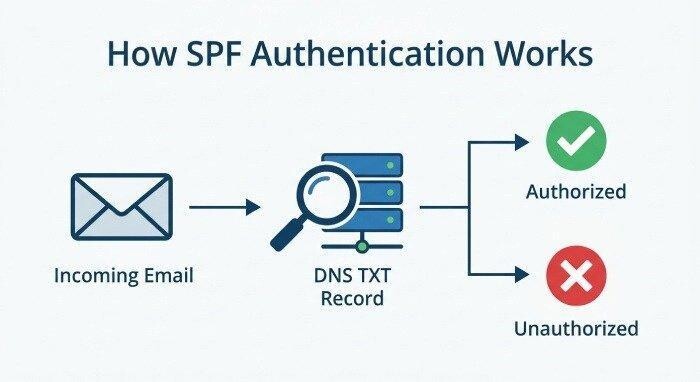
Sender Policy Framework (SPF) is a fundamental layer of email authentication aimed at bolstering email security, reducing spam, and defending against phishing attacks. An SPF record is a specialized DNS record, published in your domain name’s DNS zone, that lists the mail servers authorized to send emails on behalf of your domain. This mechanism allows receiving email systems to perform an SPF record check—verifying that messages claiming to be from your organization actually originate from permitted sources. Without a valid SPF record, emails are more likely to be flagged by spam filters, stripped of sender credibility, or outright rejected, which can severely compromise email deliverability.
An SPF record is specifically designed to prevent domain spoofing—a frequent exploit used in phishing campaigns. The SPF record syntax outlines explicit rules that define authorized sending IP addresses or hostnames. Major email providers such as Google and Microsoft recommend all organizations set up a valid SPF record as a critical part of their overall email protection stack.
Beyond its standalone value, SPF is a core component within the wider authentication protocols ecosystem, working in concert with DMARC, DKIM, BIMI, TLS-RPT, and MTA-STS to enforce modern email security frameworks. These protocols collectively improve email health, enable robust delivery reporting, and enhance the reputation of your domain name across mail servers globally.
How an SPF Record Generator Simplifies Setup and Reduces Errors
Automating SPF Record Creation for Accuracy
While it’s possible to manually craft an SPF record, doing so leaves room for missteps—especially in complex sending environments. An SPF record generator eliminates manual guesswork by providing an intuitive interface that guides users step-by-step. By using an SPF record creator from trusted entities like MxToolbox, EasyDMARC, or SuperTool, administrators dramatically reduce the odds of misconfigured syntax or overlooked senders. A quality SPF record generator allows you to easily select which mail servers, IP addresses (IPv4 or IPv6), and services (Google Workspace, Microsoft 365, on-premise, third-party providers) are allowed to transmit mail on your behalf.
Minimizing SPF Syntax and Policy Errors
SPF specifications are strict—errors like missing mechanisms, extra spaces, or exceeding the DNS lookup limit can cause a once-valid SPF record to break, leading to unintentional mail delivery failures. With an SPF record generator, you benefit from built-in syntax checks and guidelines informed by current SPF specifications. These tools flag any deviation in the SPF syntax, alerting you to parameters such as exceeding lookup limits (10 DNS lookups max), record length, or conflicting qualifiers (e.g., SoftFail, Fail, Neutral).
An SPF checker built into most modern SPF record generators goes a step further, automatically running an SPF record check after generation. This means the provided DNS record is both SPF-compliant and ready for immediate DNS implementation. Features such as automated error-warnings, policy explanations, and knowledge base links support administrators in building a valid SPF record the first time, sparing hours of troubleshooting.
Key Inputs Needed to Generate an Accurate SPF Record
Critical Information for Precise SPF Record Generation
A well-designed SPF record generator will request several key data points to ensure your record is both accurate and future-proof:
- Domain Name: The primary domain for which the SPF record is being established.
- Authorized Sending IPs (IPv4/IPv6): Include all server IP addresses—on-premise, third-party, or cloud-based—authorized to deliver messages.
- A Records and MX Records: Indicate whether hosts listed in the domain’s A record or mail servers defined by its MX record are permitted senders.
- Third-Party Services: For organizations leveraging SaaS or bulk mailing providers (such as Google, Microsoft, Mailchimp), ensure you select the correct services so the generator includes their requisite include or redirect mechanisms.
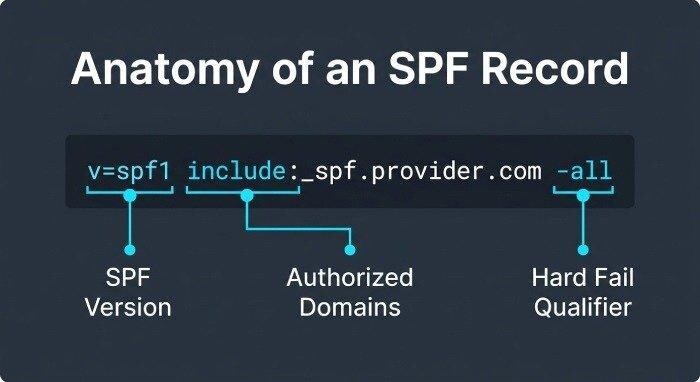
- Policy Qualifiers & Failure Policy: Define how recipient servers should treat unauthorized emails, using qualifiers such as ~all (SoftFail), -all (Fail), or ?all (Neutral). Each setting has a different impact on email protection and deliverability.
- Advanced Mechanisms: Options such as exists, redirect (to another SPF record), or specifying the use of a DMARC, DKIM, or BIMI record for enhanced authentication protocols.
A top-tier SPF record creator integrates optional DNS lookups, syntax check utilities, and lookup analysis. Select products like the EasyDMARC SPF Record Generator or MxToolbox’s SPF tools will also scan for existing SPF record conflicts and compatibility with DMARC and DKIM authentication policies for comprehensive email security.
Handling Existing SPF Records and Manual Edits
If your domain already has an existing SPF record, the SPF record generator can often import and analyze it, making it simple to modify the SPF record or merge new settings without introducing errors. For legacy domains, always start with an SPF checker or domain scanner to audit current settings and avoid duplicate or conflicting DNS records.
How to Verify, Publish, and Test Your SPF Record in DNS
Publishing Your SPF Record via DNS Manager
Once you generate SPF record content, publishing it is typically a matter of updating your domain’s TXT DNS record via your DNS provider (such as Cloudflare, AWS Route 53, or your registrar’s DNS Manager). The SPF TXT record must be added to the root of your domain name, and only one SPF record per domain is permitted—multiple records will break SPF authentication.
For most DNS providers, the record should follow the SPF syntax:
v=spf1 include:_spf.provider.com ip4:203.0.113.5 ip6:2001:db8::1a2b mx -all
Verifying and Testing with SPF Checkers
After publishing, always conduct an SPF record check using a reputable SPF checker tool such as MxToolbox, EasyDMARC SuperTool, or Bettertracker. These solutions retrieve and validate the DNS record, alert you to syntax errors, invalid mechanisms, excessive DNS lookups, blacklist flags, and compatibility with other protocols like DMARC and DKIM. Advanced SPF checkers often allow reverse lookup, analyze headers, and provide email health or delivery center reports. A DMARC Report can also provide valuable visibility into authentication results and unauthorized sending activity. For added peace of mind, some platforms (such as Touchpoint MSP or EasySender) offer alert manager services for proactive monitoring.
Ongoing Reputation and Health Monitoring
Maintaining long-term email security involves more than a single configuration. Utilize reputation monitoring, periodic DNS lookup audits, domain scanner tools, and email health dashboards (available from vendors like EasyDMARC and MxToolbox) to ensure ongoing compliance with authentication protocols and to promptly identify deliverability or blacklist issues.
Common SPF Configuration Mistakes and Best Practices
Frequent Pitfalls in SPF Record Management
- Multiple SPF Records: Only one SPF record is valid per domain name—multiple records cause SPF to fail. Use an SPF record creator or manual edit to consolidate settings.
- Too Many DNS Lookups: SPF specifications limit to 10 DNS lookups per record. Overuse of include or redirect can breach this threshold, causing email authentication to break. An SPF checker or record generator will flag this problem.
- Incorrect Mechanisms: Careless use of mx, a, ip4, ip6, exists, or third-party includes can unintentionally authorize unwanted senders.
- Ignoring Failure Policy Impact: Overly permissive (~all/SoftFail) or overly strict (-all/Fail) policies can cause delivery issues or insufficient email protection.
Best Practices for Robust SPF Record Management
Frequent Reviews and Automated Tools
- Regular SPF Record Check: Audit your SPF record after infrastructure changes (e.g., adding a new marketing platform).
- Utilize SPF Record Generators: Leverage tools from industry leaders like MxToolbox, EasyDMARC, and SourceForge to automate generation, modify SPF records, and validate changes before going live.
- Test With Real-World Deliverability: Send test emails and analyze headers for SPF authentication results. Use MX Lookup and Delivery Center tools to confirm proper sender validation.
- Integrate With Comprehensive Protocols: Pair a valid SPF record with DMARC record generator and DKIM record generator utilities for a multi-layer authentication setup. Cross-check with BIMI record checker tools for brand logo compliance.
- Monitor Blacklists and Threat Intelligence: Leverage domain scanner, reputation check, and phishing link checker resources to defend against threats and optimize sender reputation.
By following these strategies, supported by an SPF record generator or creator and vigilant use of SPF checkers, organizations can safeguard their email ecosystem, boost deliverability, and maintain trust with recipients. For ongoing education, refer to vendor knowledge bases and authentication best practices maintained by MxToolbox, Expert Insights, and others in the email security landscape.