


It started, as these things often do, with a half-dozen browser tabs. Every other day a new AI music site seemed to surface in a social feed, promising studio-quality tracks in seconds. I was genuinely curious about what these tools could do for quick video soundtracks and podcast intros, but I quickly learned that not all of them wanted to help me make music—some just wanted to serve auto-play video ads while I waited for a generation that might never finish. That’s when I decided to methodically test several platforms, including an AI Music Generator that looked less flashy but felt more trustworthy from the first click. What followed was a slow, careful sifting through clutter, broken promises, and the occasional pleasant surprise.
My goal wasn’t to find the tool with the single most stunning demo. I wanted something I could use without holding my breath every time I hit “generate.” I’d been burned before by sites that played a wonderful 15-second preview and then crashed, or asked me to subscribe just to download a track I’d already waited five minutes to hear. Over two weeks, I ran the same prompts across six AI music platforms—focusing less on raw creative potential and more on whether the experience felt safe, repeatable, and free of the kind of friction that kills a creative session.
What I noticed immediately was how differently these sites treated a user who wasn’t ready to commit money. Some greeted me with pop-ups, sticky banners, and pre-roll ads that made the generation queue feel like a waiting room in a low-budget game. Others were pristine but produced audio that sounded like it had been compressed in a wind tunnel. The gap between a clean first impression and an honest, daily-usable tool turned out to be wide, and a single generation was never enough to tell the real story.
The real test was what happened on a Tuesday afternoon when I needed five variations of a lo-fi beat for a client project. I had lyrics ready and a clear mood in mind, but three of the tools I tried first either injected watermarks that made the previews unusable for client review or limited me to two generations per day unless I upgraded. That kind of friction isn’t just inconvenient; it makes you second-guess whether the tool will be there when deadlines tighten. When I switched to an AI Music Maker that let me describe tempo, mood, and instruments in a single text field without fighting pop-ups, the difference was less about sound and more about the headspace I reclaimed. I could iterate without the low-grade anxiety of being sold to mid-creative flow.
To bring some structure to my scattered impressions, I built a table that rated each platform on dimensions that mattered beyond a flashy demo: sound quality, loading speed, the ever-present ad distraction, update activity as a proxy for long-term reliability, and interface cleanliness. The scores reflect what I experienced after logging multiple hours on each site, not a single first impression.
| Platform | Sound Quality | Loading Speed | Ad Distraction | Update Activity | Interface Cleanliness | Overall Score |
| Suno | 9 | 7 | 4 | 8 | 6 | 6.8 |
| Udio | 8 | 6 | 5 | 7 | 6 | 6.4 |
| Soundraw | 7 | 8 | 8 | 6 | 8 | 7.4 |
| Mubert | 6 | 9 | 7 | 5 | 9 | 7.2 |
| Beatoven | 7 | 7 | 7 | 6 | 8 | 7.0 |
| ToMusic AI | 8 | 8 | 9 | 7 | 9 | 8.2 |
Looking at those numbers, a pattern emerged that I hadn’t expected. Suno produced wonderfully expressive vocal tracks—I’d give its peak sound quality a slight edge over ToMusic AI—but the ad experience and interface clutter around those generations made it hard to stay in a working rhythm. Udio felt similar, with a steeper learning curve and frequent interruptions. Soundraw and Beatoven offered clean, professional interfaces, but their instrumental tracks sometimes lacked the textural depth I was hoping for, and their update cycles seemed slower. Mubert was speedy and ad-free in its paid tier, yet the musical output felt more like generative background texture than a track I could shape with intent. ToMusic AI didn’t win by a landslide in any single metric, but it also didn’t lose. The ad distraction score was the most telling: a 9 meant I could work for an hour and never feel like the platform was trying to extract something from me before I’d even decided if I liked the product.
The generation reliability angle is worth underlining. When I talk about ad distraction, I don’t just mean banner ads. I mean the entire experience of a site that seems to prioritize monetization over function—long load times disguised by video ads, aggressive upgrade nudges before you can even hear a full preview, or daily limits so tight that testing the tool properly takes a week. These aren’t just annoyances; they erode trust. If I can’t reliably generate a track during a 20-minute break, the tool becomes a hobby rather than a work instrument. Across my tests, ToMusic AI’s absence of in-your-face promotion and its straightforward library access made it the platform I returned to when I was tired and just needed something to work.
How I Approached the Safety and Trust Test
What I Measured Beyond the Audio File
I knew I couldn’t rely solely on my ears. I created a simple testing protocol: for each platform, I would generate three types of audio—a purely instrumental mood piece, a song from custom lyrics, and a short sting for a video outro. I timed each generation, noted any ads or pop-ups that interrupted the flow, and checked whether the download was a clean, high-quality file or a compressed preview with a watermark. I also looked at how often each platform had pushed updates to its model or interface, using changelogs and community chatter as rough proxies. This wasn’t a scientific lab test; it was the kind of hands-on checking a small-studio creator might do before recommending a tool to a collaborator.
What I found was that loading speed and ad distraction were inversely correlated on the worst-offending sites. The platforms that leaned hardest into ad placements also tended to have slower generation queues—whether by design or server prioritization, I can’t say. But the effect was the same: the more a site interrupted me, the longer I waited. ToMusic AI’s consistent loading times, hovering around 15–30 seconds for most prompts, didn’t feel blazing fast in an absolute sense, but they were predictable. And predictability, I’ve learned, is more valuable than occasional speed bursts in a creative workflow.

The Moment I Realized Interruptions Were a Dealbreaker
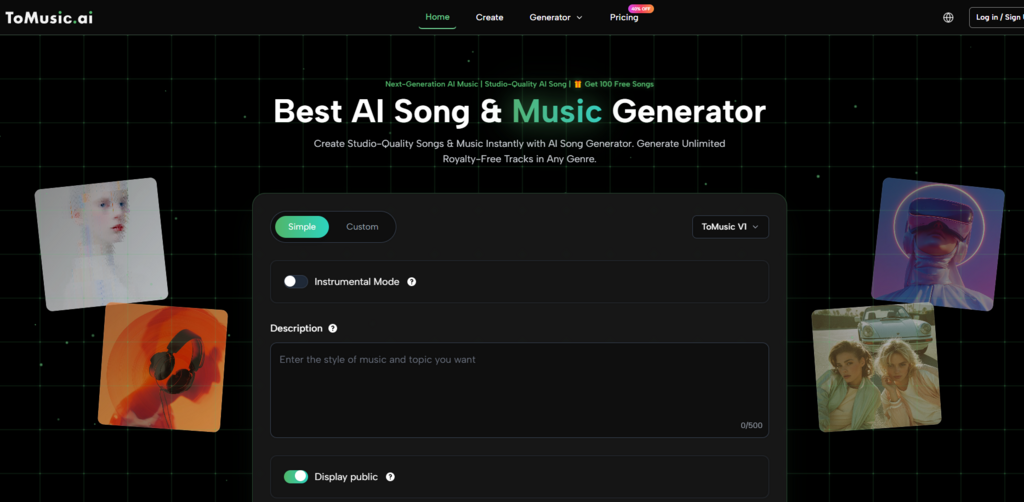
There was a specific instance that crystallized this for me. I was testing a platform that shall remain nameless, and after composing a lyric about a quiet morning in a coastal town, I hit generate. A 30-second video ad for a mobile game started playing with sound on, and there was no mute button visible. The generation eventually failed with a generic error, and I lost the lyrics I’d typed. I’m not saying this is the norm, but it happened once too often across a couple of sites. When I moved back to ToMusic AI, the simplicity of entering a prompt in a clean text area, choosing between simple and custom modes, and getting a result that landed in a manageable Music Library felt almost undervalued. The site indicates royalty-free usage for commercial projects, which added a layer of calm I didn’t know I needed.
How ToMusic AI’s Workflow Cut Through the Noise
A Simple Path from Idea to Downloadable Track
ToMusic AI didn’t ask me to learn a new production paradigm. The flow was straightforward enough that I could explain it to a client in two minutes, which became a quiet advantage. Here’s how it worked in my repeated use:
- I picked the simple generation path when I just wanted a quick instrumental, or the custom mode when I had lyrics and a specific arrangement in mind.
- I typed a prompt describing style, mood, tempo, and instrumentation—sometimes adding vocal direction like “soft male vocals with slight reverb.”
- When presented with the option, I selected an available AI music model from the multiple AI music models the platform offers; I didn’t need to understand their differences beyond a brief description.
- I generated the track, listened to it directly in the browser, and either saved it to the Music Library for later downloading or exported it right away.
That’s not a revolutionary workflow, but its lack of friction was the point. Other tools sometimes buried the download behind a series of upsell screens or required me to name the track before I could even hear it. ToMusic AI let me build a small library of experiments over a few days, which meant I could revisit and compare versions without re-generating from scratch. The Music Library became a quiet asset I hadn’t anticipated needing, but after a week of juggling multiple projects, I relied on it.
Why Library Management Mattered More Than I Expected
In the first few days of testing, I treated each generation as disposable. But when I needed to recall a specific ukulele-backed track I’d made on a Tuesday for a brand pitch, the ability to scroll through saved items rather than recreate the prompt from memory saved me twenty minutes. It’s a feature that doesn’t sound exciting in a bullet-point list, but in practice it nudged ToMusic AI from a toy to a referenceable tool. I’ve seen similar saving features on other platforms, but they often feel tacked on. Here, the library felt integrated into the normal flow, not an afterthought.
Where the Tool Stumbled and Who It Best Serves
Honest Limitations That Emerged During Daily Use
No tool survives two weeks of daily scrutiny without revealing its edges. ToMusic AI’s sound quality, while consistently pleasant, didn’t reach the organic vocal expressiveness that Suno sometimes delivers when the stars align. There were moments when I wished I could push a track into a darker harmonic territory and felt the model pulled toward a safer, more commercial sound. That’s not a flaw so much as a character trait—the platform seemed optimized for short videos, content creation, ads, and education rather than avant-garde sound design. For a creator making daily vlogs or social media ads, that’s probably a strength. For someone looking to score an experimental short film, it might feel limiting.
The multiple AI music models helped, as I could switch between them to nudge the output, but I never got the sense that I was sculpting sound at the level of a DAW. That’s not what the tool promises, and I think it’s important to say that out loud. I also noticed that very specific instrumental prompts—like “a detuned piano with tape warble and street noise in the background”—yielded results that sounded more like clean studio recordings of the idea, not the gritty texture I’d imagined. The tool interprets direction cleanly, sometimes too cleanly.

Who Might Find ToMusic AI the Right Daily Driver
If you’re a content creator, marketer, educator, or indie game developer who needs music that won’t get flagged and doesn’t have the time to tinker with a dozen parameters, the balanced experience ToMusic AI offers begins to look less like a compromise and more like a practical choice. It’s the platform I’d recommend to a friend who has been burned by ad-heavy sites and just wants to open a tab, type an idea, and get a usable file. For musicians exploring AI-assisted songwriting, the custom lyrics mode and multiple model options provide enough flexibility to stay interesting, though they may outgrow it for final production. The site’s commercial-friendly terms remove a headache that often hides in the fine print elsewhere.
My testing didn’t reveal a perfect tool. It revealed a field full of tools that are very good at one thing and quietly frustrating at several others. ToMusic AI’s highest overall score came not from a single brilliant feature but from the fact that I stopped dreading the platform experience itself. In a landscape where distraction is the default, that counted for more than I thought it would.
After two weeks of generating, deleting, comparing, and occasionally swearing at loading screens, the tool I kept going back to wasn’t the one with the most viral demo. It was the one that let me work without telling me every ten minutes that my creativity needed an upgrade.

