There’s plenty of entertaining and informative content on Facebook and Instagram that isn’t available for offline viewing. Here’s how you can fetch all of that high-definition video content to watch offline, using SnapDownloader with just a few steps.
There’s no denying the fact that we are obsessed with motion pictures, right from the early 20th century when cameras came along. Movies and TV shows have been around for decades via cable TV, but with the cord-cutting revolution, services like YouTube changed the game. The most extensive library of community uploaded videos, and YouTube stands today with more than 2 billion users – that’s more than a quarter of the entire human population!
Ever since social media networks such as Facebook, Twitter, Instagram, and others came along, the creation and sharing of video content far more straightforward, and it’s all there in the numbers. It’s no secret that video content is booming on these social media platforms, which is apparent by the release of IGTV by Instagram and Facebook Watch. These sub-platforms of their respective social media networks are built around user-generated video content, with more than 4 billion videos viewed on Facebook alone.
Table of Contents
No Internet? SnapDownloader Saves the Day
Albeit technology has come lightyears ahead in just the past decade, with mobile communication at its peak, it certainly isn’t perfect. Even today, there are 25% of households in the United States alone that do not have access to the internet, and this number quadruples when you take the rest of the world into consideration. YouTube, the largest player in the game, has found a way to counter this grave issue on the mobile front, at least, by offering the ability to save videos for offline viewing.
However, YouTube, Facebook, Twitter, Instagram, and other social media platforms don’t extend the same feature in their apps. With thousands of independent content creators, big-name entertainment houses, and news outlets offering hours of content on these platforms, you have all the reasons to download videos from Facebook and Instagram for offline viewing, and SnapDownloader makes it easier than ever.
SnapDownloader Features:
Download videos from 900+ websites – SnapDownloader allows you to download videos not just from Facebook and Instagram but more than 900 websites.
Convert video to MP3 – This particular feature comes in handy when fetching audio content on YouTube or any other multimedia platform. Whether you want to download audiobooks, podcasts, music tracks, or narrated documentaries, SnapDownloader is the right choice.
Download videos up to 8K resolution – Although YouTube is the only platform on the internet supporting 8K resolution streaming, SnapDownloader already has you covered. In the meantime, you can download Facebook and Instagram videos in 4K, 1080p, 720p, and standard video formats too.
Region unlocking proxy feature – SnapDownloader allows you to quickly set up a proxy and bypass geo-restrictions on YouTube and social media platforms. Just download videos blocked in your region and access content that would otherwise be hidden.
How to Download Instagram Videos with SnapDownloader
For the sake of this tutorial, we’ve taken Instagram as an example, but the download process is very similar for all other platforms including Facebook and YouTube.
Before you can start enjoying the best of viral video content offline, you will need to download the SnapDownloader app.
Step 1: Set up SnapDownloader on your computer
1. Open a web browser on your computer and navigate to SnapDownloader website.
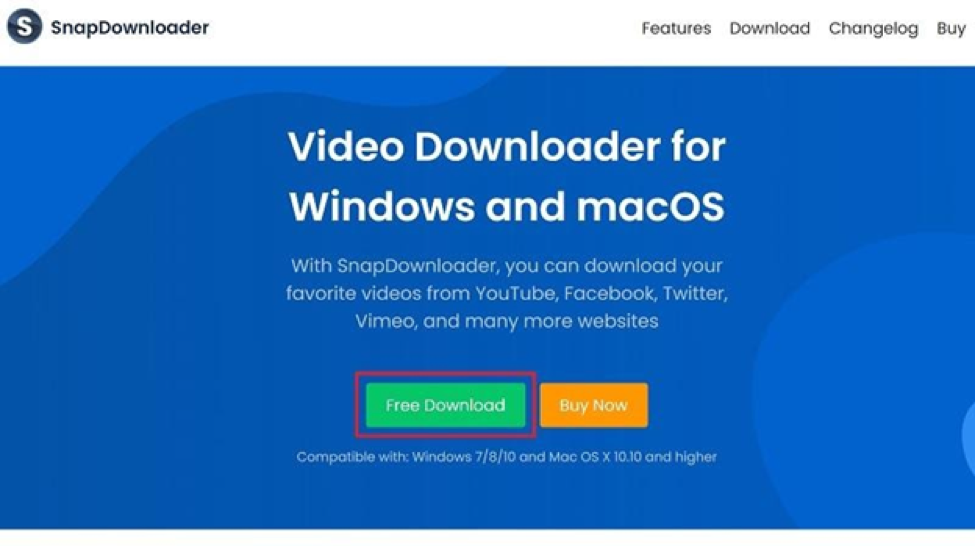
2. Press the Free Download button and download SnapDownloader for Windows or macOS.
3. Open the SnapDownloader setup file after it has been downloaded.4.
4. Continue the process to install the app and press the Finish button to launch SnapDownloader.
Step 2: Download Instagram videos with SnapDownloader
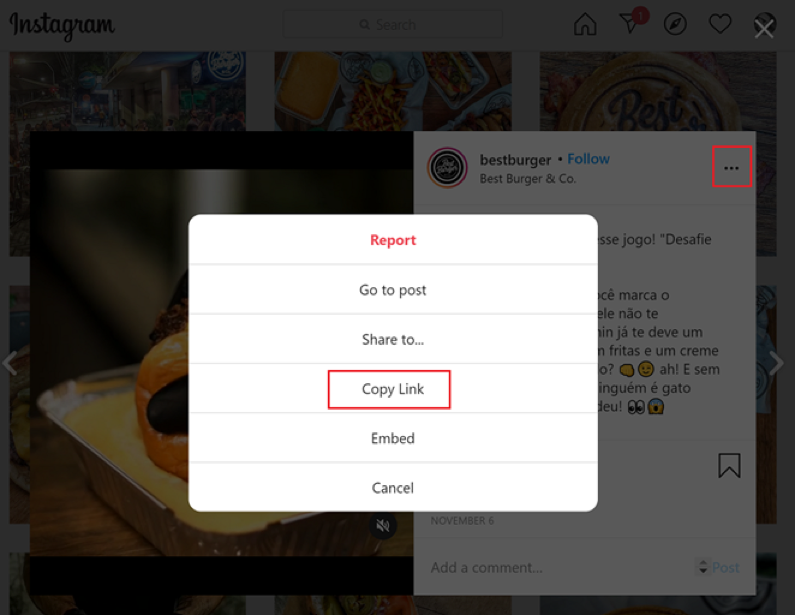
- Open Instagram and find the video that you want to download.
- Press the three-dot button on the video window and click on the Copy Link button.
3. Open the SnapDownloader app, paste the link of the video you copied from Instagram in the search bar.
4. You can also use the same search bar to enter a keyword and look up a video online.
5. The option to select the output (MP4 or MP3)will be given. Select your preferred output format. Next, select the video quality in which you want to download the video.
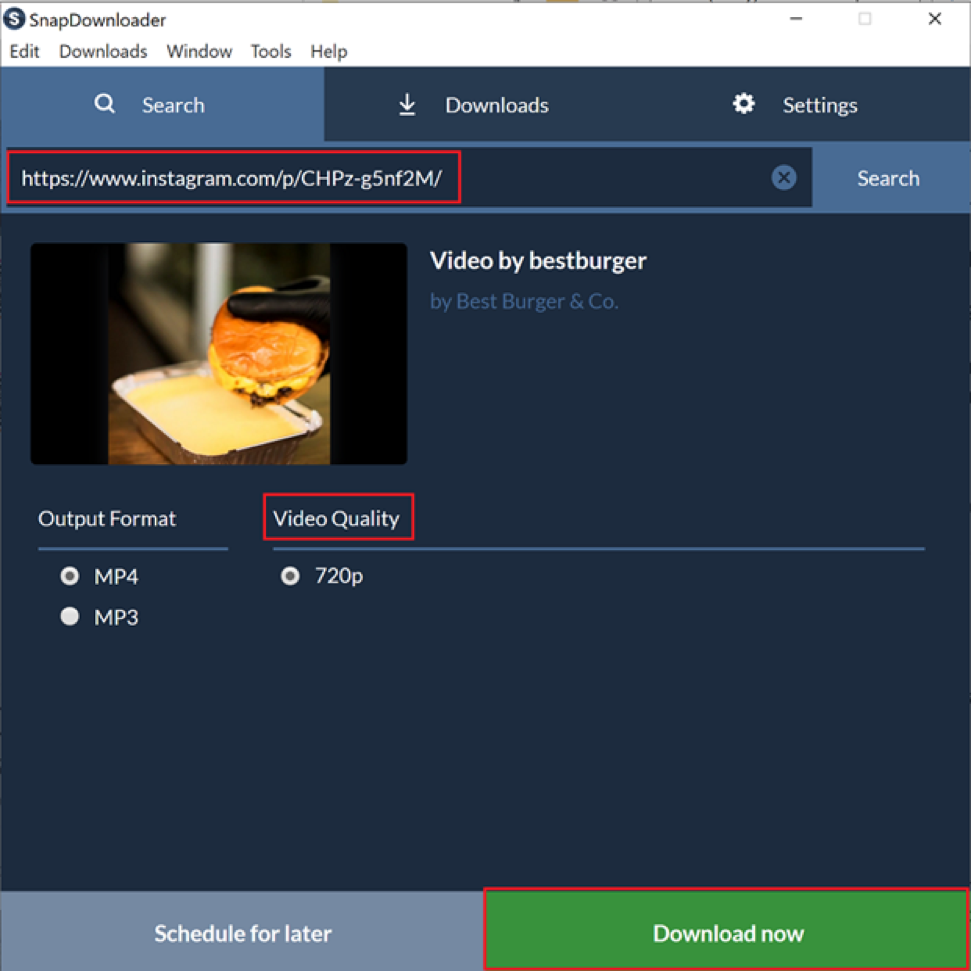
6. You can choose to press the Download now to begin or select Schedule for later if you want to download the video at a later time. This feature is especially useful for those on a metered connection.
7. The download will now begin and will be able to see the file size, download speed, and estimated time left before completion.
8. That’s all there is to it! After the download is finished, just click on the video to play it offline.
Wrapping Up
The entire process to download videos from any other popular social media platform like Facebook, Twitter, Twitch, Vimeo, and others is precisely the same. All you need to get started is get a hold of the video URL, paste it into the SnapDownloader search field, and you’re all set. While there are plenty of services that claim to download YouTube videos, there just aren’t enough for other social media platforms, with the exception of SnapDownloader.
Are you willing to give SnapDownloader a try for your love of video content on social media? Do let us know what you think of it in the comments section right down below.
