
Adding a short talking photo video to a software project portal or sprint handoff package gives enterprise clients a clear, human explanation of who owns each deliverable and what needs approval before Friday. Anyone who has managed custom software delivery, ERP integrations, or cloud migrations knows what happens when you send a client stakeholders group a 22-page kickoff PDF and a link to a Jira board. The executive sponsor skims the cover page, the department heads confuse the solution architect with the QA lead, and three days before User Acceptance Testing (UAT) begins, nobody on the client side remembers how to log into the staging environment.
Consultancies often try to fix this by asking engagement managers or lead engineers to record custom webcam welcome videos for every new client account. That sounds great during a sales pitch, right up until two delivery pods are launching in the same week across Madrid, London, and Chicago. Senior architects hate spending forty minutes recording and re-recording webcam intros between code reviews, and webcam lighting from home offices rarely matches the polish of an enterprise statement of work.
If you are delivering a two-week discovery audit for a single founder who talks to you on Slack every morning, skip the video portal altogether. When you are onboarding a 15-person client steering committee where half the stakeholders missed the live kickoff call, a structured 45-second spoken introduction on each portal page keeps the engagement moving without pulling engineers off billable work.
Table of Contents
Why a talking photo video outperforms unread kickoff PDFs in client delivery
In B2B software services, client friction rarely comes from bad code. It almost always comes from missed expectations during three specific handoffs: the week-one kickoff, the mid-project UAT staging review, and the final production handover to the client’s internal IT team.
When a consultancy relies solely on written wiki pages or static slide decks during those three transitions, three predictable problems slow down sign-off:
- Role confusion on the client side. Clients regularly copy the wrong person on urgent change requests because a static org chart does not make it memorable who handles scope changes versus who handles staging bug reports.
- Skipped pre-work before live calls. If a client product owner has to read four pages of instructions just to test a new checkout flow in staging, they will wait until the live Thursday review call to ask basic login questions, burning forty minutes of expensive meeting time.
- High maintenance when project dates shift. If a delivery lead records a ten-minute live video walking through the whole project plan, moving the UAT milestone by one week renders that entire video inaccurate.
Decoupling the spoken explanation from a live camera session solves the maintenance problem. By keeping a clean, approved headshot for each delivery lead and generating short 30-to-45-second clips from text scripts, a project coordinator can update a milestone date or staging instruction in five minutes.
| Project Delivery Milestone | Portal Placement | Who Appears in the Clip | Core Action Requested from Client |
|---|---|---|---|
| 1. Project Kickoff Hub | Top of the shared Notion or Confluence client space | Engagement Manager | Confirm stakeholder access list and sign off on Sprint 1 scope |
| 2. Team & Escalation Directory | Beside the pod contact cards | Tech Lead & QA Lead | Route API schema questions to Tech Lead; log UI bugs in the UAT form |
| 3. UAT Staging Walkthrough | Above the test environment login link | QA or Delivery Lead | Test the 3 priority user journeys before Thursday at 3:00 PM |
| 4. Post-Launch Admin Handoff | Inside the final operations runbook | Solutions Architect | Review backup schedules, role permissions, and support SLA contacts |
A four-step playbook to build client-ready presenter clips
To keep client education videos helpful, authoritative, and fast to produce, delivery operations teams follow a strict four-step process.
Step 1: Standardize employee portraits and written consent during onboarding
Never improvise with low-resolution LinkedIn crops or casual team party photos. When a consultant, project manager, or architect joins your delivery practice, capture a high-resolution, front-facing studio portrait against a clean neutral background and sign a standard internal media release covering client-facing project materials.
Having a uniform set of well-lit portraits ensures that whether a client interacts with your cloud engineering pod or your data analytics pod, every video card in the client portal looks cohesive.
Step 2: Write role and milestone scripts around one concrete client action
A client stakeholder watching a portal clip between back-to-back meetings does not want corporate mission statements. They want to know what is happening this week and what button they need to click. Follow the Digital.gov plain language guidelines by keeping sentences active, direct, and under 20 words each.
Keep every script between 60 and 90 words (roughly 25 to 40 seconds of spoken audio). For a UAT handoff card, a strong script reads like this:
- Context (10 seconds): “Hi team, I’m Elena, the QA lead for your billing portal migration. Staging build 2.4 is now live and ready for your review.”
- What to focus on (15 seconds): “Please focus your testing this week on two flows: generating a multi-currency invoice and exporting the monthly VAT summary. Note that automated email receipts are intentionally paused in staging.”
- Action and deadline (10 seconds): “Log any layout or calculation feedback using the form right below this video by Thursday at 4:00 PM so we can lock the release candidate on Friday.”
Step 3: Generate the clip and pair it with scannable reference artifacts
Once the delivery lead approves those three short paragraphs in Slack, the project coordinator uses Leadde.ai to create a talking presenter from a still image by uploading the consultant’s portrait, pasting the approved script, selecting a clear voice profile, and exporting the captioned MP4 for the client portal.
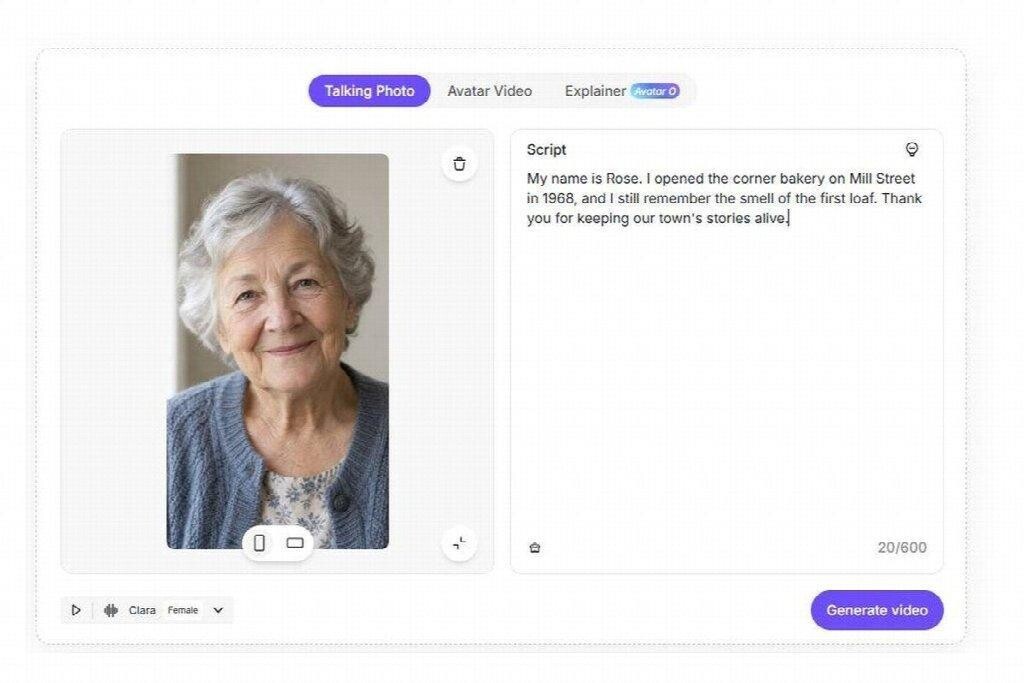
Never make the video the only place where URLs, test credentials, or deadlines exist. No client wants to pause a video at the 18-second mark to copy a staging URL by hand. Place the 35-second presenter video at the top of the card to establish context and urgency, and put the clickable staging link, test account credentials, and deadline in a clean 3-bullet box directly underneath the player.
Step 4: Localize handoff guides for multinational client rollouts
Many software consultancies build a core platform for a corporate headquarters in English and then roll out the same system to regional subsidiaries across Spain, Mexico, Germany, and Brazil. Usually, regional store managers or local finance clerks receive second-hand training because nobody has the budget to film live software walkthroughs in four languages.
Because a text-driven presenter workflow separates the script from the image, delivery teams can duplicate an approved English handoff module across 88 supported languages and 175 dialects, have a bilingual consultant verify the local ERP field names in ten minutes, and give every regional branch a native-language walkthrough on day one. When clients know exactly who is guiding their project and what is expected at every gate, UAT sign-offs happen faster and scope misunderstandings drop sharply.